Security Testing
1. Overview
The purpose of this document is to provide details on Security testing, tool recommendation and Standardization of OWASP Dependency Check.
2. Security Testing
Security testing checks whether software is vulnerable to cyber-attacks, and tests the impact of malicious or unexpected inputs on its operations.
Security testing provides evidence that systems and information are safe and reliable, and that they do not accept unauthorized inputs.
Security testing is a type of non-functional testing. Unlike functional testing, which focuses on whether the software’s functions are working properly (“what” the software does), non-functional testing focuses on whether the application is designed and configured correctly.
2.1 Types of Security Testing
- Penetration Testing
- Application Security Testing
- Web Application Security Testing
- API Security Testing
- Vulnerability Management
- Configuration Scanning
- Security Audits
- Risk Management
- Security Posture Assessment
2.2 Best Practice for Security Testing
- Shift security testing left
- Test internal interfaces, not just APIs and UIs
- Automate and test often
- Third-party components and open-source security
- Use the OWASP Web Security Testing Guide
- Security testing with Bright Security
3. Checklist To Be Followed By Testing Team For Performing Security Testing
This checklist consists of industry best practices and guidelines which testing team should follow while performing testing.
- OWASP WSTG Security Best Practices Checklist
(Excel reference: OWASP checklist document)
4. Best Practice for Node.js Security
- Regularly log and monitor activities
- Avoid blocking the Event Loop
- Use flat Promise chains
- Implement strong authentication policies
- Manage errors securely
- Use anti-CSRF tokens
- Minimize data leakage
- Proper session management with cookie flags
- Control request size (prevent DoS)
- Use strong passwords and secure packages
- Implement access control rules
- Regularly update dependencies
- Use security headers
- Avoid dangerous functions
- Use strict mode
5. Tool Recommendation
OWASP Dependency Check is recommended for Node.js security testing. It is used for managing and securing open-source dependencies.
6. Standardization of OWASP Dependency Check
6.1 OWASP Dependency Check Testing Tool for Node.js
- Identifies open-source dependencies
- Checks known vulnerabilities
- Created by OWASP
- Supports Java, .NET, and experimental Node.js support
- Runs via CLI, Maven, Jenkins, Gradle, etc.
- Requires internet access for vulnerability database updates
- Can generate XML, JSON, and HTML reports
6.2 Prerequisites for using OWASP Dependency Check Tool
- Requires Java 8+ installed
- Install tool depending on OS (Windows/Linux)
- Can be run via command line
- Outputs XML/JSON/HTML reports
- First scan may take longer due to vulnerability database download
- Reports are cached for future runs
- Can integrate with Jenkins/SonarQube
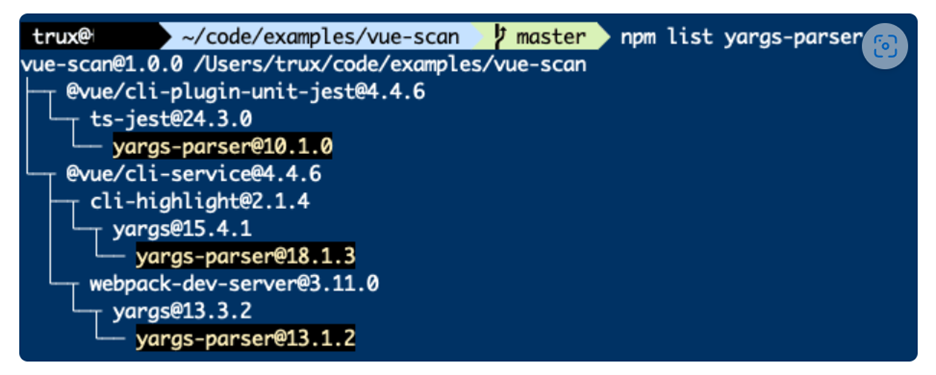
- Use
npm listto trace transitive dependencies - Actions for vulnerabilities:
- Report issue to library repo
- Submit fix PR
- Update dependency versions
- Replace library if needed
7. OWASP Testing Guide PDF
Refer to the OWASP Testing Guide:
- OWASP Testing Guide v4 PDF (official document)